preferences.json Format
Hain supports Plugin Preferences by preferences.json using JSONSchema.
You can put your preferences.json into your plugin folder, then it works.
and You can open Preferences Dialog by entering /preferences in Hain.
See http://json-schema.org/ for JSONSchema
Example
You can make your plugin preferences like:
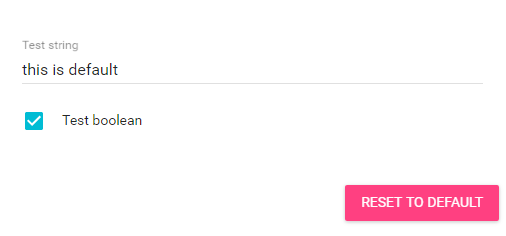
by following JSONSchema:
{
  "type": "object",
  "properties": {
    "testStr": {
      "type": "string",
      "title": "Test string",
      "default": "this is default"
    },
    "testBool": {
      "type": "boolean",
      "title": "Test boolean",
      "default": true
    }
  }
}
and You can access the preferences via pluginContext.preferences such as:
'use strict'

module.exports = (pluginContext) => {
  const logger = pluginContext.logger;
  const prefObj = pluginContext.preferences;

  const pref = prefObj.get();
  logger.log(pref.testStr);
  logger.log(pref.testBool);

  // or
  logger.log(prefObj.get('testStr'));
  logger.log(prefObj.get('testBool'));

  function startup() { ... }
  function search(query, res) { ... }
  function execute(id, payload) { ... }

  return { startup, search, execute };
};
Non-Standard Options
errorMessages
You can customize displaying error messages to what you wantExample
{
  "type": "string",
  "minLength": 3,
  "errorMessages": "This is error!"
}
or
{
  "type": "string",
  "minLength": 3,
  "maxLength": 5,
  "errorMessages": {
    "minLength": "This is Error for minLength",
    "maxLength": "This is Error for maxLength"
  }
}
Enum Values
You can define enum values for string propertyExample
{
  "type": "string",
  "enum": [
    "a",
    "b",
    "c"
  ]
}
Limitations
Currently, Type of root object must be object.